

Creating Posts
Start a new post from the calendar, the P keyboard shortcut, an existing idea, or by duplicating another post.
Every piece of content in Ordinal starts with creating a post. Once created, you can draft your content, add media, configure settings, and schedule it for publishing. Here’s how to get started.
How to Create a Post
| Method | How to do it |
|---|---|
| Calendar | Click any date on the calendar to create a post for that day. |
| Keyboard shortcut | Press P anywhere in Ordinal to instantly open the create post modal. |
| From an idea | Open an idea from your backlog and click Add to Calendar to convert it to a post. |
| Duplicate | Open any existing post, click the … menu, and select Duplicate. |
Create Post Modal
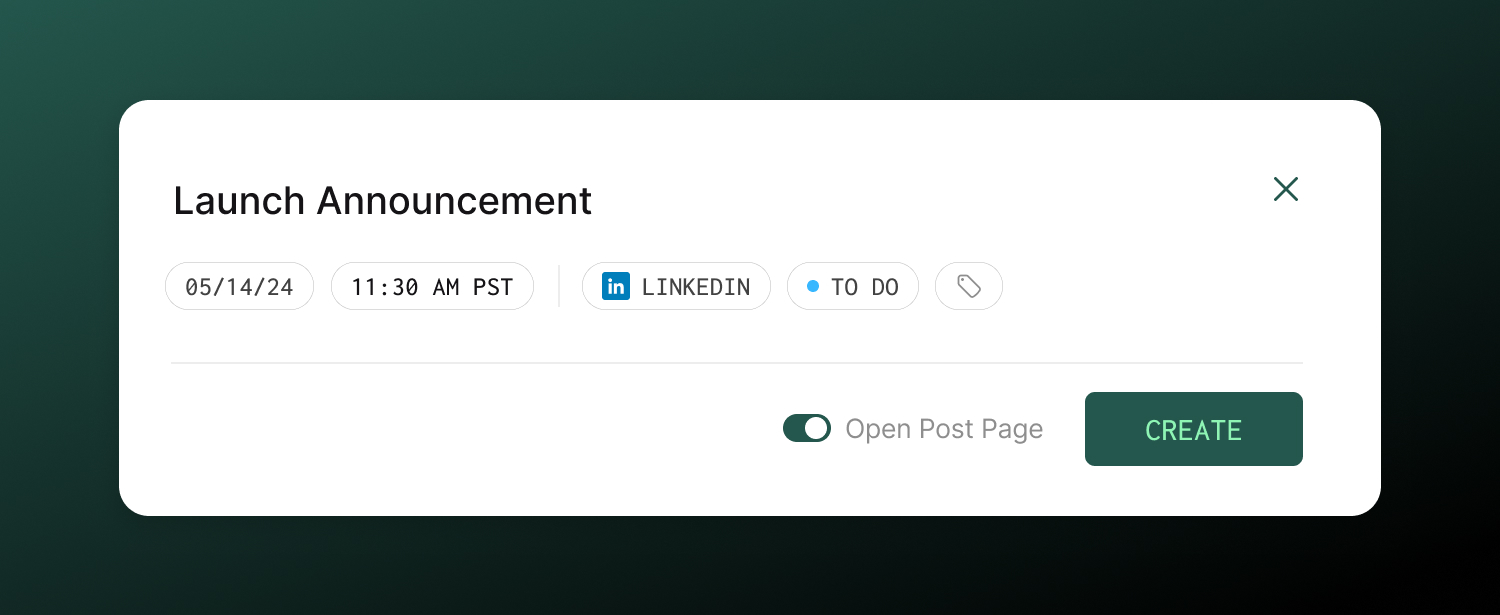
When you create a new post, a modal opens where you’ll configure the basics before diving into the full editor.
| Option | Description |
|---|---|
| Title | Give your post a descriptive title |
| Publish Date | Date for the post |
| Publish Time | Optionally choose a time for the post. You can also set this later on the Post Page itself. |
| Account | Select the connected account the post should go to. When a channel has multiple connected profiles, a nested submenu opens where you can pick a specific profile. Search the dropdown by channel, profile name, or handle. You can add cross-post channels later. |
| Labels | Optionally tag with labels to categorize by content type or topic. |
| Open Post Page | Toggle on to immediately open the full post editor after creation. Toggle off to stay on your current page. |
Once you click Create, your post is saved and you can start drafting your content in the full editor.