

TikTok
Schedule TikTok videos and photo carousels with captions, privacy, and interaction settings. Publishes directly to your account.
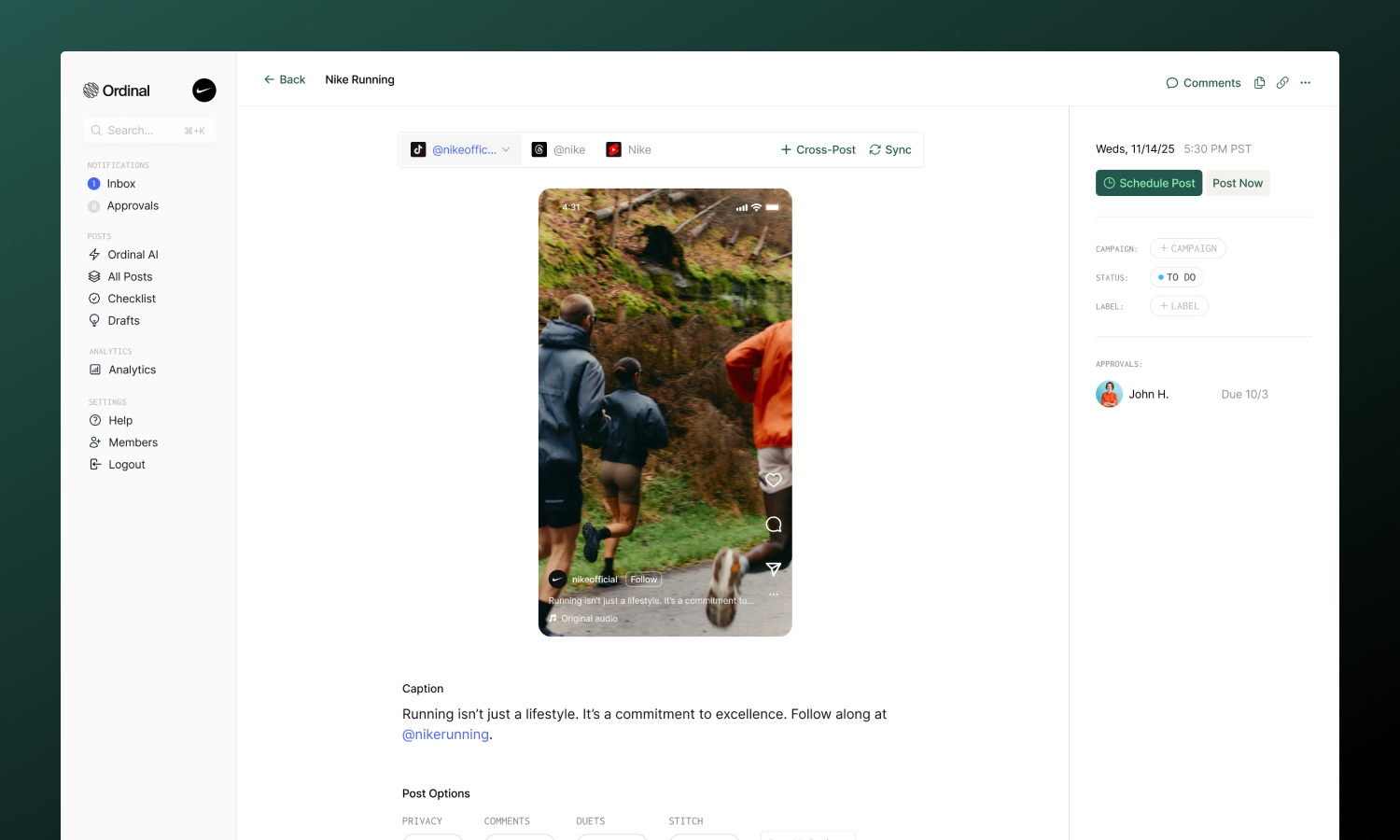
TikTok offers some of the best organic reach of any platform - if you have the content to match. In Ordinal, you can schedule videos or photo carousels with captions and hashtags, configure privacy and interaction settings, and publish directly to your account.
Overview
Connecting TikTok
Connect your Business or Creator account
Drafting a Post
Captions, hashtags, and mentions
Post Settings
Privacy, comments, duets, and more
Analytics
Track video performance
Connecting TikTok
Go to Settings → Profiles → Scheduling → TikTok, click “Connect TikTok”, and sign in. Authorize Ordinal and your account will appear in your connected profiles.
Drafting a TikTok Post
What you can post
| Content | Supported | Notes |
|---|---|---|
| Videos | ✅ | Single video per post |
| Photo carousels | ✅ | 1–35 images per post |
| Trending sounds | ❌ | API limitation |
| Filters/effects | ❌ | API limitation |
| Duets/Stitches | Video only | Not available on photo posts |
| Text overlays | ❌ | API limitation |
Use the Video / Photo toggle at the top of the editor to switch between content types. Switching clears the current attachments, so pick the type that matches your media before uploading.
Caption & Formatting
Write captions to accompany your video:
- Bold / Italic: Use the toolbar buttons for Unicode formatting
- Hashtags: Type
#followed by your tag - they’ll link to TikTok’s tag page when published - @Mentions: Type
@followed by a username to tag other creators
Captions can be up to 2,200 characters.
Post Preview
As you draft your post, the editor shows a live preview that matches how your content will appear in the TikTok feed - complete with your profile picture, username, and caption overlay. Photo posts show a carousel preview you can swipe through to check image order before publishing.
Cover frame
Video posts let you choose which frame TikTok uses as the cover thumbnail. Open the Cover Frame option on a TikTok video post to scrub through the video and pick a moment - the selected frame is then used in the in-app preview and sent to TikTok at publish time.
If you don’t pick a frame, TikTok defaults to the first frame of the video. When you duplicate a post or cross-post from Instagram, Facebook, or LinkedIn, the selected cover frame is carried over to TikTok automatically when possible.
Video Requirements
For video posts, here are the specs:
| Spec | Limit |
|---|---|
| Formats | MP4, MOV |
| Resolution | 360px to 4096px (width and height) |
| Aspect ratio | 9:16 (vertical) recommended |
| Duration | 3 seconds to 10 minutes |
| File size | 350mb maximum |
Vertical video (9:16) performs best and fills the entire screen. Horizontal or square videos work but won’t have the same impact. Files over 125MB are automatically compressed before upload.
Photo Requirements
Photo posts publish as a swipeable carousel. You can upload up to 35 images, and Ordinal automatically resizes anything wider than 1080px to keep uploads fast.
| Spec | Limit |
|---|---|
| Formats | JPG, JPEG, PNG, WEBP |
| Images | 1 to 35 per post |
| Max width | 1080px (auto-resized) |
| File size | 10mb per image |
After uploading, drag images to reorder them - the first image is used as the cover. You cannot mix images and videos in the same post.
Title and description
Photo posts use a title and description instead of a single caption:
- Title: Up to 90 characters. Shown above the carousel.
- Description: Up to 4,000 characters. Supports hashtags and
@mentionsjust like video captions.
Post Settings
Configure how viewers can interact with your post. You’ll find these options below the editor:
- Privacy: Choose who can see your post - Public, Followers, Friends, or just yourself
- Comments: Enable or disable comments
- Cover Frame (video only): Pick the video frame TikTok uses as the cover thumbnail. See Cover frame.
- Duets (video only): Allow others to create Duets with your video
- Stitch (video only): Allow others to Stitch your video into their content
- Auto-add music (photo only): Let TikTok automatically add a soundtrack to your photo carousel
- Sponsored: Mark the post as promotional content
- Paid Partnership: Disclose paid brand partnerships (only appears if Sponsored is enabled)
Analytics
Analytics are not currently available for TikTok, but are coming soon. Send us an email at support@tryordinal.com if you’re interested in early access.
Analytics overview
Learn more about tracking performance across all your connected profiles.