> ## Documentation Index
> Fetch the complete documentation index at: https://docs.tryordinal.com/llms.txt
> Use this file to discover all available pages before exploring further.
# TikTok
> Schedule TikTok videos and photo carousels with captions, privacy, and interaction settings. Publishes directly to your account.
TikTok offers some of the best organic reach of any platform - if you have the content to match. In Ordinal, you can schedule videos or photo carousels with captions and hashtags, configure privacy and interaction settings, and publish directly to your account.
 ## Overview
Connect your Business or Creator account
Captions, hashtags, and mentions
Privacy, comments, duets, and more
Track video performance
## Connecting TikTok
Go to [**Settings → Profiles → Scheduling → TikTok**](https://app.tryordinal.com/settings/profiles/scheduling/tiktok), click "Connect TikTok", and sign in. Authorize Ordinal and your account will appear in your connected profiles.
## Drafting a TikTok Post
### What you can post
| Content | Supported | Notes |
| -------------------------------------- | ---------- | ---------------------------- |
| [Videos](#video-requirements) | ✅ | Single video per post |
| [Photo carousels](#photo-requirements) | ✅ | 1–35 images per post |
| Trending sounds | ❌ | API limitation |
| Filters/effects | ❌ | API limitation |
| Duets/Stitches | Video only | Not available on photo posts |
| Text overlays | ❌ | API limitation |
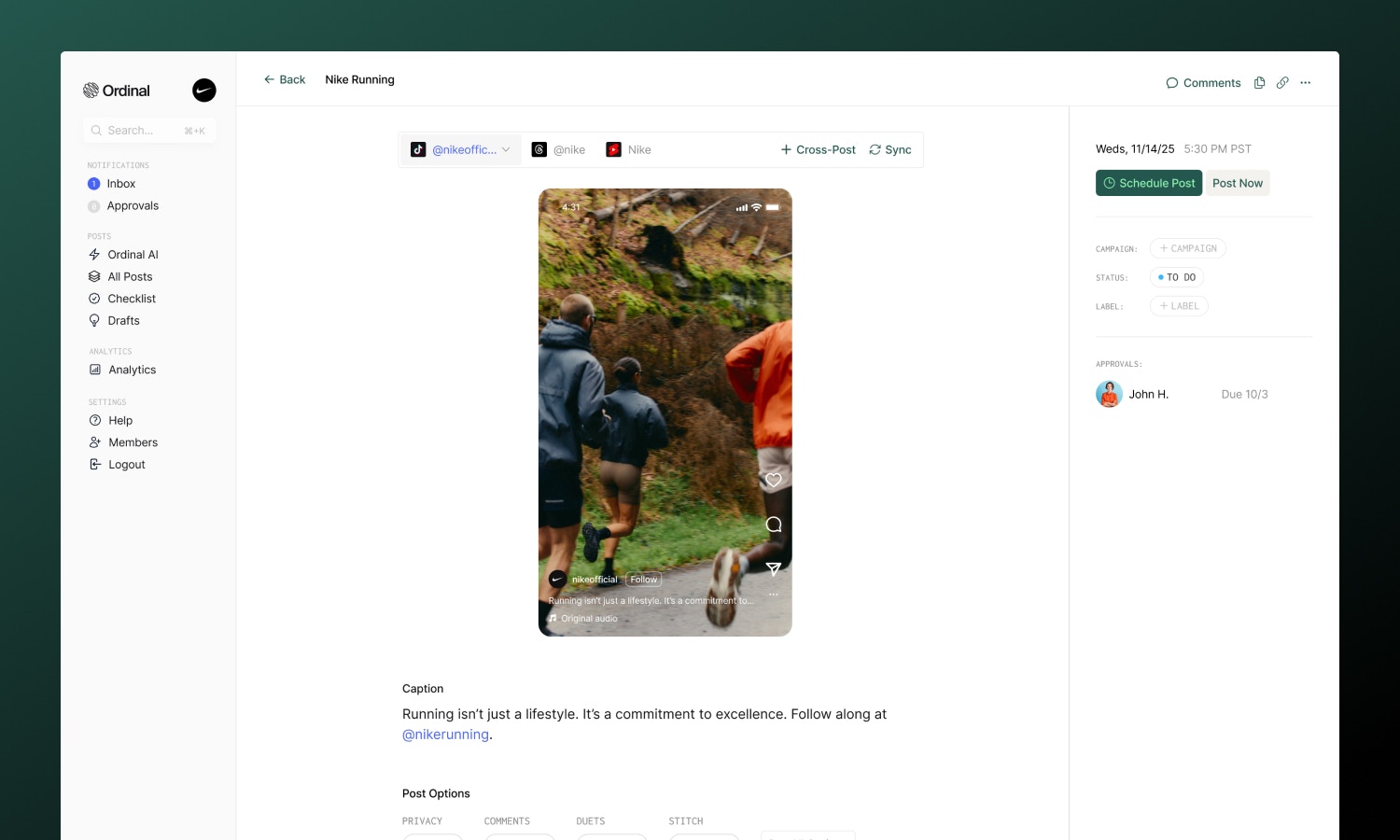
Use the **Video / Photo** toggle at the top of the editor to switch between content types. Switching clears the current attachments, so pick the type that matches your media before uploading.
### Caption & Formatting
Write captions to accompany your video:
* **Bold / Italic**: Use the toolbar buttons for Unicode formatting
* **Hashtags**: Type `#` followed by your tag - they'll link to TikTok's tag page when published
* **@Mentions**: Type `@` followed by a username to tag other creators
Captions can be up to **2,200 characters**.
Mix trending hashtags with niche-specific ones. 3–5 per post is a good balance for discoverability without looking spammy.
### Post Preview
As you draft your post, the editor shows a live preview that matches how your content will appear in the TikTok feed - complete with your profile picture, username, and caption overlay. Photo posts show a carousel preview you can swipe through to check image order before publishing.
### Cover frame
Video posts let you choose which frame TikTok uses as the cover thumbnail. Open the **Cover Frame** option on a TikTok video post to scrub through the video and pick a moment - the selected frame is then used in the in-app preview and sent to TikTok at publish time.
If you don't pick a frame, TikTok defaults to the first frame of the video. When you duplicate a post or cross-post from Instagram, Facebook, or LinkedIn, the selected cover frame is carried over to TikTok automatically when possible.
### Video Requirements
For video posts, here are the specs:
| Spec | Limit |
| ------------ | ---------------------------------- |
| Formats | MP4, MOV |
| Resolution | 360px to 4096px (width and height) |
| Aspect ratio | 9:16 (vertical) recommended |
| Duration | 3 seconds to 10 minutes |
| File size | 350mb maximum |
Vertical video (9:16) performs best and fills the entire screen. Horizontal or square videos work but won't have the same impact. Files over 125MB are automatically compressed before upload.
### Photo Requirements
Photo posts publish as a swipeable carousel. You can upload up to 35 images, and Ordinal automatically resizes anything wider than 1080px to keep uploads fast.
| Spec | Limit |
| --------- | --------------------- |
| Formats | JPG, JPEG, PNG, WEBP |
| Images | 1 to 35 per post |
| Max width | 1080px (auto-resized) |
| File size | 10mb per image |
After uploading, drag images to reorder them - the first image is used as the cover. You cannot mix images and videos in the same post.
#### Title and description
Photo posts use a **title** and **description** instead of a single caption:
* **Title**: Up to 90 characters. Shown above the carousel.
* **Description**: Up to 4,000 characters. Supports hashtags and `@mentions` just like video captions.
## Post Settings
Configure how viewers can interact with your post. You'll find these options below the editor:
* **Privacy**: Choose who can see your post - Public, Followers, Friends, or just yourself
* **Comments**: Enable or disable comments
* **Cover Frame** (video only): Pick the video frame TikTok uses as the cover thumbnail. See [Cover frame](#cover-frame).
* **Duets** (video only): Allow others to create Duets with your video
* **Stitch** (video only): Allow others to Stitch your video into their content
* **Auto-add music** (photo only): Let TikTok automatically add a soundtrack to your photo carousel
* **Sponsored**: Mark the post as promotional content
* **Paid Partnership**: Disclose paid brand partnerships (only appears if Sponsored is enabled)
Enabling Duets and Stitches on video posts can increase your reach - other creators using your content exposes you to their audience.
## Analytics
Analytics are not currently available for TikTok, but are coming soon. Send us an email at [support@tryordinal.com](mailto:support@tryordinal.com) if you're interested in early access.
Learn more about tracking performance across all your connected profiles.
## Learn more
Similar short-form vertical format.
Set the perfect time for your content.
## Overview
Connect your Business or Creator account
Captions, hashtags, and mentions
Privacy, comments, duets, and more
Track video performance
## Connecting TikTok
Go to [**Settings → Profiles → Scheduling → TikTok**](https://app.tryordinal.com/settings/profiles/scheduling/tiktok), click "Connect TikTok", and sign in. Authorize Ordinal and your account will appear in your connected profiles.
## Drafting a TikTok Post
### What you can post
| Content | Supported | Notes |
| -------------------------------------- | ---------- | ---------------------------- |
| [Videos](#video-requirements) | ✅ | Single video per post |
| [Photo carousels](#photo-requirements) | ✅ | 1–35 images per post |
| Trending sounds | ❌ | API limitation |
| Filters/effects | ❌ | API limitation |
| Duets/Stitches | Video only | Not available on photo posts |
| Text overlays | ❌ | API limitation |
Use the **Video / Photo** toggle at the top of the editor to switch between content types. Switching clears the current attachments, so pick the type that matches your media before uploading.
### Caption & Formatting
Write captions to accompany your video:
* **Bold / Italic**: Use the toolbar buttons for Unicode formatting
* **Hashtags**: Type `#` followed by your tag - they'll link to TikTok's tag page when published
* **@Mentions**: Type `@` followed by a username to tag other creators
Captions can be up to **2,200 characters**.
Mix trending hashtags with niche-specific ones. 3–5 per post is a good balance for discoverability without looking spammy.
### Post Preview
As you draft your post, the editor shows a live preview that matches how your content will appear in the TikTok feed - complete with your profile picture, username, and caption overlay. Photo posts show a carousel preview you can swipe through to check image order before publishing.
### Cover frame
Video posts let you choose which frame TikTok uses as the cover thumbnail. Open the **Cover Frame** option on a TikTok video post to scrub through the video and pick a moment - the selected frame is then used in the in-app preview and sent to TikTok at publish time.
If you don't pick a frame, TikTok defaults to the first frame of the video. When you duplicate a post or cross-post from Instagram, Facebook, or LinkedIn, the selected cover frame is carried over to TikTok automatically when possible.
### Video Requirements
For video posts, here are the specs:
| Spec | Limit |
| ------------ | ---------------------------------- |
| Formats | MP4, MOV |
| Resolution | 360px to 4096px (width and height) |
| Aspect ratio | 9:16 (vertical) recommended |
| Duration | 3 seconds to 10 minutes |
| File size | 350mb maximum |
Vertical video (9:16) performs best and fills the entire screen. Horizontal or square videos work but won't have the same impact. Files over 125MB are automatically compressed before upload.
### Photo Requirements
Photo posts publish as a swipeable carousel. You can upload up to 35 images, and Ordinal automatically resizes anything wider than 1080px to keep uploads fast.
| Spec | Limit |
| --------- | --------------------- |
| Formats | JPG, JPEG, PNG, WEBP |
| Images | 1 to 35 per post |
| Max width | 1080px (auto-resized) |
| File size | 10mb per image |
After uploading, drag images to reorder them - the first image is used as the cover. You cannot mix images and videos in the same post.
#### Title and description
Photo posts use a **title** and **description** instead of a single caption:
* **Title**: Up to 90 characters. Shown above the carousel.
* **Description**: Up to 4,000 characters. Supports hashtags and `@mentions` just like video captions.
## Post Settings
Configure how viewers can interact with your post. You'll find these options below the editor:
* **Privacy**: Choose who can see your post - Public, Followers, Friends, or just yourself
* **Comments**: Enable or disable comments
* **Cover Frame** (video only): Pick the video frame TikTok uses as the cover thumbnail. See [Cover frame](#cover-frame).
* **Duets** (video only): Allow others to create Duets with your video
* **Stitch** (video only): Allow others to Stitch your video into their content
* **Auto-add music** (photo only): Let TikTok automatically add a soundtrack to your photo carousel
* **Sponsored**: Mark the post as promotional content
* **Paid Partnership**: Disclose paid brand partnerships (only appears if Sponsored is enabled)
Enabling Duets and Stitches on video posts can increase your reach - other creators using your content exposes you to their audience.
## Analytics
Analytics are not currently available for TikTok, but are coming soon. Send us an email at [support@tryordinal.com](mailto:support@tryordinal.com) if you're interested in early access.
Learn more about tracking performance across all your connected profiles.
## Learn more
Similar short-form vertical format.
Set the perfect time for your content.